Folder Size Tree2.0
Publisher Description
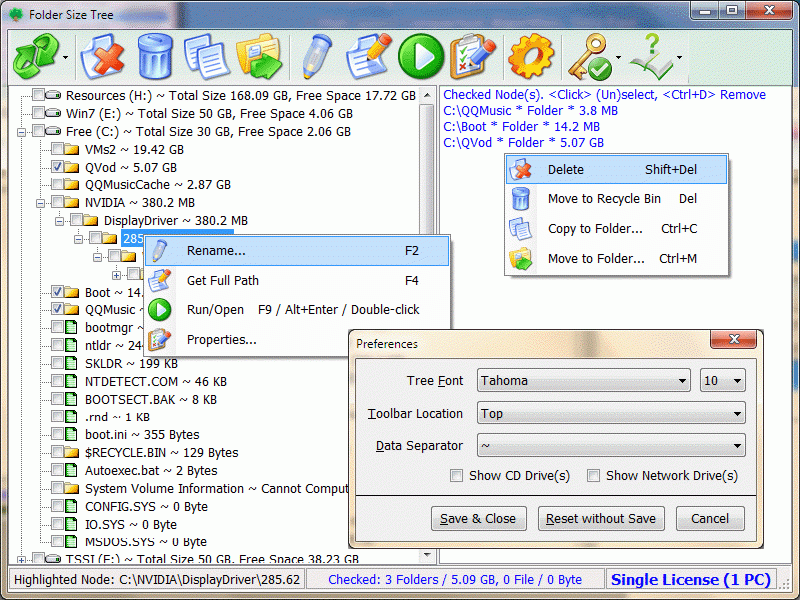
Folder Size Tree displays all drives/folders/files size in a tree view, in order to let you to manually clean disk space conveniently. It displays the local and network drives, folders and files with their sizes (automatically sorted by size in descending order), and you can do some common operations for the checked items in batch mode, such as Delete, Copy and Move. Also, it has a few special operations (e.g. Get Item Full Path) for the selected resource. Actually, it is a UNIX-like "du" command, you can think it as a Windows GUI "du" program. Key features: 1. Display Drives / Folders / Files Size in Tree View. 2. Operate Checked Items in Batch Mode. 3. Sort Files/Folders by Size in Descending Order. 4. Smart Size Unit. 5. Smart Size Decimal. 6. Provide Common File/Folder Commands. 7. Supports to Copy Full Path. 8. Supports to Customize Software UI.
About Folder Size Tree
This File & Disk Management program is available in English. It was last updated on 29 September, 2026. Folder Size Tree is compatible with the following operating systems: Windows.
The company that develops Folder Size Tree is XiXi Software. The latest version released by its developer is 2.0.
The download we have available for Folder Size Tree has a file size of N/A. Just click the green Download button above to start the downloading process. The program is listed on our website since 2014-11-04 and was downloaded 13 times. We have already checked if the download link is safe, however for your own protection we recommend that you scan the downloaded software with your antivirus. Your antivirus may detect the Folder Size Tree as malware if the download link is broken.
How to install Folder Size Tree on your Windows device:
- Click on the Download button on our website. This will start the download from the website of the developer.
- Once the Folder Size Tree is downloaded click on it to start the setup process (assuming you are on a desktop computer).
- When the installation is finished you should be able to see and run the program.
Program Details
System requirements
Download information
Pricing
Version History
version 2.0
posted on 2014-11-04
Displays the statistics of the checked resource(s) on the status bar. Displays the highlighted resource on the status bar due to you may not see the highlighted node on the left tree during browsing the resources. And many more.
